

0x03 Trainings · Training 01

20 seats · 16 modules · 31 demos

Crack the Mac

From ARM64 assembly to licence bypasses, binary patching and building your own keygen. On Apple Silicon, two days, hands on.

Registration opens 1 November 2026

Includes a complimentary Individual Conference Pass for 3–4 April 2027.
When
1–2 April 2027
Time
10:00 AM–2:00 PM IST
From
₹10,000
Level
Beginner to intermediate
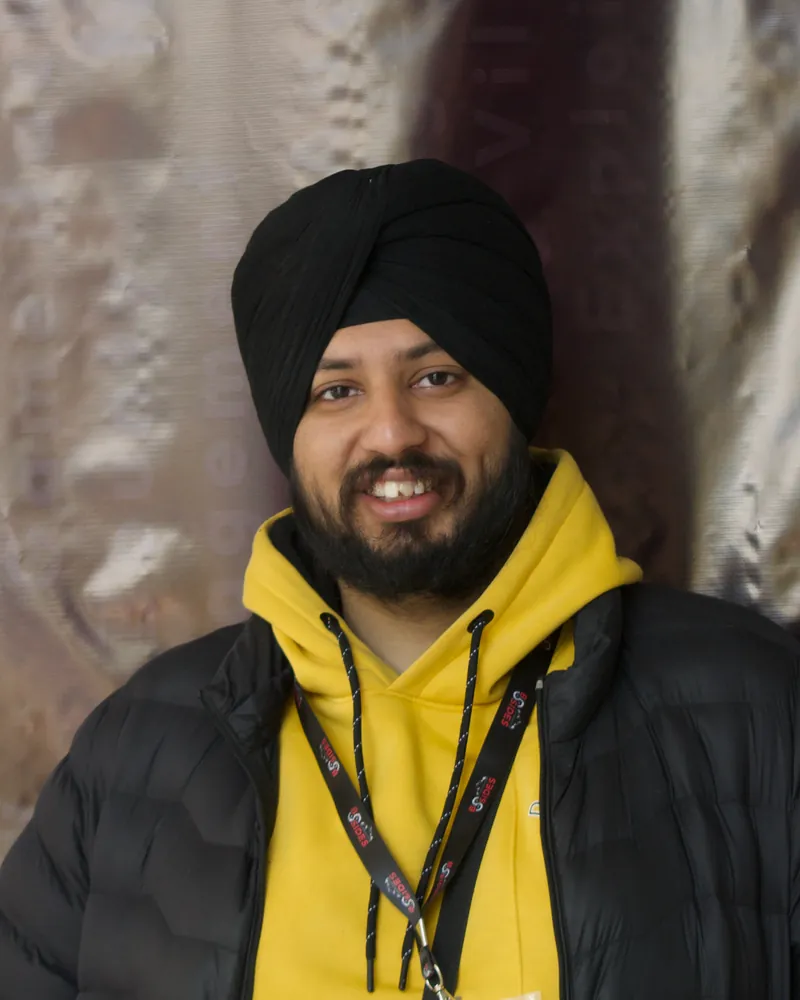
Sanchay Singh

01 Your trainer

Sanchay Singh

Cybersecurity trainer · Founder, HackersVilla

His reverse engineering started in Class 9, taking apart games like GTA and Assassin's Creed before he knew it was a security field. When he is not teaching, he is probably reversing games or exploring macOS binaries.

  • 1,000+learners trained
  • 25,000+reached through webinars
  • 20+talks at Null Delhi
Has trained
EY, Deloitte, KPMG, MicrosoftAnd faculty programmes at institutions including DU and IIT Kanpur.
Has spoken at
BSides Mumbai, Pune, Dehradun and DelhiAlso CracCON, Seasides and DC9111.
Community
HackersVilla (2021), CyberSangam Meetups (2025)A former lead, now a volunteer, at Null Delhi.

02 Included

What you get

A separately paid training. No conference pass to buy.

  • Complimentary Individual Conference Pass

    For 3–4 April 2027. Issued separately within 48 hours of payment verification. One per participant.

  • 16 modules, 31 demos

    Two days with the trainer, on a purpose-built training app.

  • Framed Certificate of Completion

    For attending both days and submitting feedback.

  • A small room

    20 seats at most, so the trainer reaches every desk.

03 Outcomes

What you will do

We won't just run a crack. We'll reverse engineer one, understand it, and build our own.

  • Read ARM64

    Registers, instructions, function calls and the Mach-O format.

  • Take apart a keygen

    Instruction by instruction, until you can rebuild its algorithm in C.

  • Find and patch the licence check

    Trace it in LLDB, then change the branch that decides.

  • Build your own keygen and activator

    From the logic you reversed. No premade cracking tools.

Tools: Ghidra, Hopper and LLDB. Every exercise uses a purpose-built macOS application, never commercial software.

04 Syllabus

Module by module

Eight modules a day. Open one to see its topics and demos.

Day 1 · Thursday 1 April 2027

ARM64, Mach-O and reversing foundations

How ARM64 instructions run, how functions work in assembly, how macOS executables are built, and how to start reversing an unknown keygen.

Modules 01–08 · Demos 1–16

  1. 01Understanding macOS, Apple Silicon and ARM642 demos
    • Computer architecture: CPU, registers, RAM, instructions, machine code and assembly
    • What actually happens when a macOS application runs
    • Apple Silicon (M1 to M4) and the ARM64/AArch64 architecture
    • Intel x86 and x64 versus ARM64 instruction sets; RISC versus CISC
    • Native ARM64 executables, Intel executables and Universal Binaries
    • How macOS loads an executable through the kernel and dyld
    • macOS application bundles and executable files
    • Demo 1 Exploring macOS executables
    • Demo 2 Compiling your first ARM64 binary
  2. 02ARM64 registers and basic assembly instructions2 demos
    • What CPU registers are for, and why reverse engineers inspect them
    • General-purpose 64-bit registers X0–X30 and their 32-bit W0–W30 views
    • Function arguments and return values in X0–X7
    • Special registers: SP, PC, X29 (frame pointer) and X30 (link register)
    • X18 and its reserved role on Apple platforms
    • Immediate values, hexadecimal numbers and memory addresses
    • Arithmetic: MOV, ADD, SUB, MUL
    • Logical and bitwise operations: AND, ORR, EOR, LSL, LSR
    • Reading assembly syntax: destination, source operands and immediates
    • Demo 3 Writing ARM64 assembly
    • Demo 4 Reading assembly through LLDB
  3. 03Memory operations, stack frames and calling conventions2 demos
    • Memory addresses, pointers and dereferencing
    • Stack versus heap versus data segments
    • The ARM64 load/store architecture: LDR, STR, LDP, STP
    • Address calculations with ADR, ADRP and ADD
    • Stack allocation and alignment
    • Function prologue and epilogue; saving and restoring X29 and X30
    • The ARM64 calling convention: arguments in registers, return values in X0
    • How local variables appear in compiled assembly
    • Demo 5 Understanding stack frames
    • Demo 6 Following data between registers and memory
  4. 04Branching, comparisons and control flow2 demos
    • Sequential execution and the program counter
    • Branches and calls: B, BL, BLR, BR and RET
    • Comparisons: CMP and TST; condition flags N, Z, C and V
    • Conditional branches: B.EQ, B.NE, B.GT, B.LT
    • Compare-and-branch: CBZ, CBNZ, TBZ and TBNZ
    • How C if/else, loops and Boolean expressions look in assembly
    • Spotting success and failure paths in a control-flow graph
    • Demo 7 Reversing conditional statements
    • Demo 8 Understanding a simple password validator
  5. 05The Mach-O executable format2 demos
    • Mach-O compared with Windows PE and Linux ELF
    • Headers and magic values; CPU type, subtype and file types
    • Load commands: LC_SEGMENT_64, LC_MAIN, LC_LOAD_DYLIB, LC_SYMTAB, LC_CODE_SIGNATURE
    • Segments and sections: __TEXT, __DATA, __LINKEDIT, __text, __cstring, __stubs, __unwind_info
    • Symbol tables and string tables
    • File offsets versus virtual memory addresses
    • ARM64 fixed-width instruction encoding
    • Demo 9 Inspecting a Mach-O binary
    • Demo 10 Exploring symbols and executable instructions
  6. 06Static reverse engineering with Ghidra and Hopper2 demos
    • Static versus dynamic analysis; disassembly versus decompilation
    • Ghidra's CodeBrowser, decompiler output and its limits
    • Functions, cross-references and symbol names
    • Control-flow graphs and basic blocks
    • Finding strings, arithmetic routines and comparison functions
    • Hopper as an alternative graphical disassembler
    • Optimised compiler output versus readable C source
    • Demo 11 First binary analysis in Ghidra
    • Demo 12 Comparing Ghidra and Hopper
  7. 07Dynamic reverse engineering with LLDB2 demos
    • Why static analysis alone is sometimes not enough
    • LLDB and debugging on macOS; symbols versus stripped executables
    • Software breakpoints; step into, over and out
    • Inspecting registers and memory
    • Instruction addresses and ASLR
    • Relating live execution to Ghidra's disassembly
    • Finding function arguments and return values at runtime
    • Demo 13 Debugging a Mach-O executable
    • Demo 14 Tracing a validation function
  8. 08Reverse engineering an existing keygen2 demos
    • What keygens are, and how locally validated serial numbers work
    • A generator versus a licence validator
    • Common serial building blocks: transformations, arithmetic, checksums and encodings
    • Hardcoded constants, lookup tables and name-based serial algorithms
    • Recognising loops and bitwise operations in compiled code
    • Where input enters the keygen and where the serial comes out
    • A method for rebuilding an algorithm from disassembly
    • Demo 15 Static analysis of a working training keygen
    • Demo 16 First dynamic trace of the keygen

Day 2 · Friday 2 April 2027

Keygen reconstruction, licence bypassing and binary patching

Rebuild the keygen's algorithm, write your own, then find, trace and patch an application's licence check, and finish with an end-to-end capstone.

Modules 09–16 · Demos 17–31

  1. 09Advanced keygen reversing and algorithm reconstruction2 demos
    • Back to the Day 1 keygen: every function behind the final serial
    • ASCII and character-to-integer transformations
    • Arithmetic sequences and modulo operations
    • XOR transformations, shifts, rotations and masking
    • Rebuilding loops and repeated transformations
    • Intermediate values and how they shape the result
    • Output formatting and serialisation logic
    • Turning assembly-level observations into readable pseudocode
    • Demo 17 Reconstructing the serial generation algorithm in Ghidra
    • Demo 18 Validating reconstructed logic through LLDB
  2. 10Writing a standalone keygen from reversed logic2 demos
    • Translating disassembled logic into C
    • Mapping ARM64 arithmetic instructions to C expressions
    • Integer sizes, signedness and overflow
    • Reimplementing bitwise operations
    • Handling string inputs and ASCII transformations
    • Functions for each transformation stage; formatting the serial
    • Testing the rebuilt algorithm against the original generator
    • Demo 19 Writing a custom keygen in C
    • Demo 20 Testing and debugging the custom keygen
  3. 11macOS application activation mechanisms2 demos
    • Software activation and licensing: keys, activation tokens and licence files
    • Offline versus online licence verification
    • A serial generator versus an activator
    • How application state changes after successful validation
    • Serial validation routines: comparisons, checksums and verification algorithms
    • Where licensing logic usually lives in an executable
    • Strings such as Invalid License, Activation Failed and Registered
    • Tracing the functions that store activation state
    • Why the activation screen may not contain the real validator
    • Demo 21 Finding the activation mechanism using Ghidra
    • Demo 22 Mapping the licensing workflow
  4. 12Dynamic analysis of licence validation2 demos
    • Runtime validation at instruction level
    • Tracking licence strings through registers and memory
    • Comparisons between supplied and expected values
    • Return values and Boolean results from validation routines
    • Conditional branches after licence checks: CMP, CBZ, CBNZ, B.EQ and B.NE
    • Spotting multiple validation checks
    • Changing a runtime value versus modifying a binary on disk
    • Demo 23 Tracing an invalid licence
    • Demo 24 Investigating the activation decision
  5. 13ARM64 binary patching2 demos
    • Binary patching and instruction replacement
    • Source-code changes versus executable-byte changes
    • 32-bit fixed-width ARM64 instruction words and little-endian bytes
    • File offsets versus virtual memory addresses
    • Modifying conditional and unconditional branches: B, B.EQ, B.NE and NOP
    • How instruction changes alter control flow, and why a wrong one crashes
    • Preserving the original executable and comparing modified bytes
    • Demo 25 Modifying ARM64 instructions in a training binary
    • Demo 26 Testing the patched executable
  6. 14Advanced patching, Intel x64 and macOS protections2 demos
    • ARM64 versus Intel x64 reversing: fixed-width versus variable-length instructions
    • Argument registers, BL versus CALL, RET and stack handling in both
    • ARM64 conditional branches versus x64 JZ and JNZ
    • How ARM64 instruction alignment affects patching
    • Mach-O code signatures and LC_CODE_SIGNATURE; how patched bytes affect them
    • Hardened Runtime, Gatekeeper, code-signing identities and entitlements
    • Telling a code-signing failure apart from a wrong patch
    • Demo 27 Comparing ARM64 and x64 validation routines
    • Demo 28 Investigating code signing after a patch
  7. 15Building a custom activator for a macOS application2 demos
    • A keygen versus an activator versus a binary patcher
    • Activation through valid serials and through application state changes
    • Designing a simple proof-of-concept activator
    • Patch locations, expected instruction bytes and replacement instructions
    • Verifying the executable before modifying it
    • Backups, rollback and checking the result
    • Why a user-space activator needs no kernel-level code
    • Demo 29 Building a custom activator
    • Demo 30 Testing activation and rollback
  8. 16Final practical: reverse, generate, patch and activateCapstone
    • You get a new training application and its compiled keygen, without source code
    • Identify the Mach-O architecture and inspect its structure
    • Find the keygen's input handling and serial generation, then recover the algorithm in pseudocode
    • Write or adapt your keygen to produce a valid serial
    • Find the licence verification function and the branch that decides activation
    • Activate with a generated serial or an authorised change to the challenge binary
    • Verify it in LLDB or static disassembly, and show the activated application
    • Final demo 31 End-to-end walkthrough: the keygen, the validation function, the control-flow decision and the activated application

05 Schedule

Two mornings

Dehradun, exact venue to be announced in January 2027.

  1. 9:30 AMReporting
  2. 10:00 AMTraining starts
  3. Each day15-minute break
  4. 2:00 PMDay ends

Same times on both days. Day 1 starts with time to set up the lab.

06 Who it is for

Before you book

For beginners and intermediates moving into reverse engineering or malware analysis, and for people who know exploitation and want the binary side.

Required

  • Linux: you can operate it
  • C or C++: you can read and write it
  • macOS: you are familiar with it

Helps, not required

  • Basic x64 assembly
  • Ghidra, IDA or similar tools
Laptop
Bring your ownA compatible laptop and its charger. A MacBook is preferred.
No MacBook?
Use Sanchay's macOS VMRuns on VMware 17 or later. Your laptop needs 16 GB RAM, Intel Core i5 (13th gen) or AMD Ryzen 5 (5th gen), or better. No hosting cost.

07 Prices

Training pass

Same training at every phase. Only the price rises.

Registration opens 1 November 2026

Conference pass included. Every training comes with a free Individual Pass for 3–4 April 2027.

Early Bird

₹10,000

Save ₹3,000

  1. Seats5 of 20
  2. Dates1–30 November 2026
  • 2 days of hands-on training
  • Individual Conference Pass
  • Small-group learning
  • Practical lab materials
  • Refreshments included
  • Framed completion certificate
Registration opens 1 November 2026

Regular

₹13,000

  1. Seats10 of 20
  2. Dates1 December 2026–20 February 2027
  • All Early Bird benefits
Opens 1 December 2026

Last Call

₹16,000

  1. Seats5 of 20
  2. Dates21 February–25 March 2027
  • All Early Bird benefits
Opens 21 February 2027
  • 2 days of training
  • 2 days of conference
  • Tea and coffee
  • Framed certificate

Per participant. Taxes and fees, if any, shown at checkout. Conference pass sent within 48 hours of payment.

08 Questions

Training questions

Ask: [email protected]

Do I need to buy a conference pass too?

No. Your training ticket comes with one complimentary Individual Conference Pass for 3–4 April 2027, sent separately after payment verification.

Do we crack real software?

No. Every exercise, including the final practical, uses a training application and keygen built for this training. Nothing commercial is patched.

Who gets the certificate?

Participants who attend both days and submit feedback get a physical, framed certificate.

I don't have a MacBook. Can I still join?

Yes. Sanchay provides a macOS VM for VMware 17 or later. Your laptop needs 16 GB RAM and an Intel Core i5 (13th gen) or AMD Ryzen 5 (5th gen), or better.

Do I need reverse engineering experience?

No. It starts from ARM64 basics. You need Linux, C or C++, and some macOS familiarity.

When do we set up the lab?

At the start of Day 1. Setup and installation time is built into the training.

Crack the Mac is the first training. More are on the way.